Virtual Staging AI vs Collov
We ran the same empty room through both tools — same room type, same style — and left each result exactly as the tool produced it. Here's what came back, what each one costs, and which one we'd put on a live listing.
Virtual Staging AI
The cleaner, more listing-ready result on the first try — cohesive furniture and believable light, with nothing to fix. The pick when you just need empty rooms staged fast.
Try Virtual Staging AI →Collov
More to adjust — swap individual furniture, restyle rooms that already have furniture, more design options — and cheaper per image at volume. Worth it if you're happy to iterate.
Try Collov →The test, in one empty room
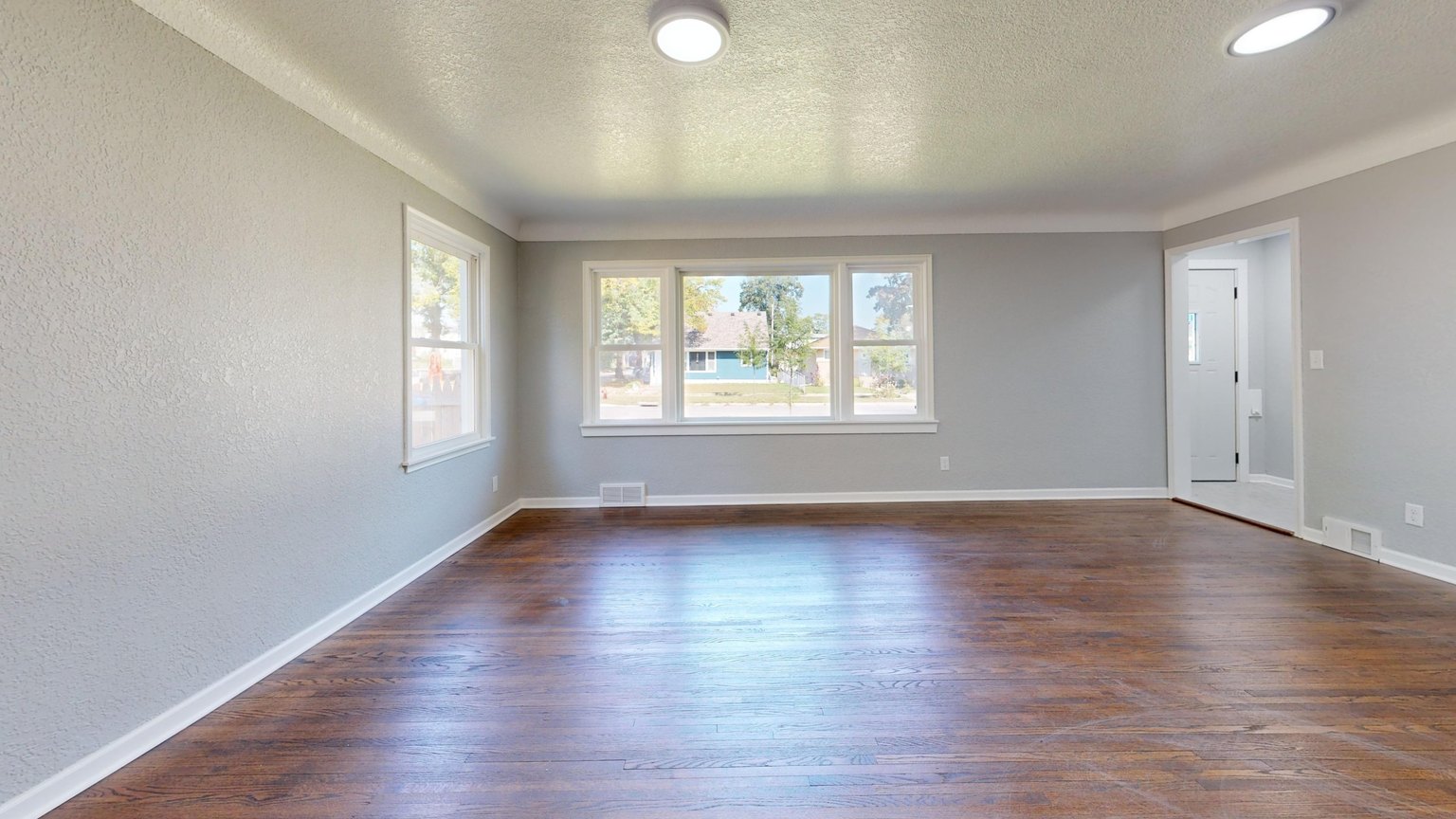
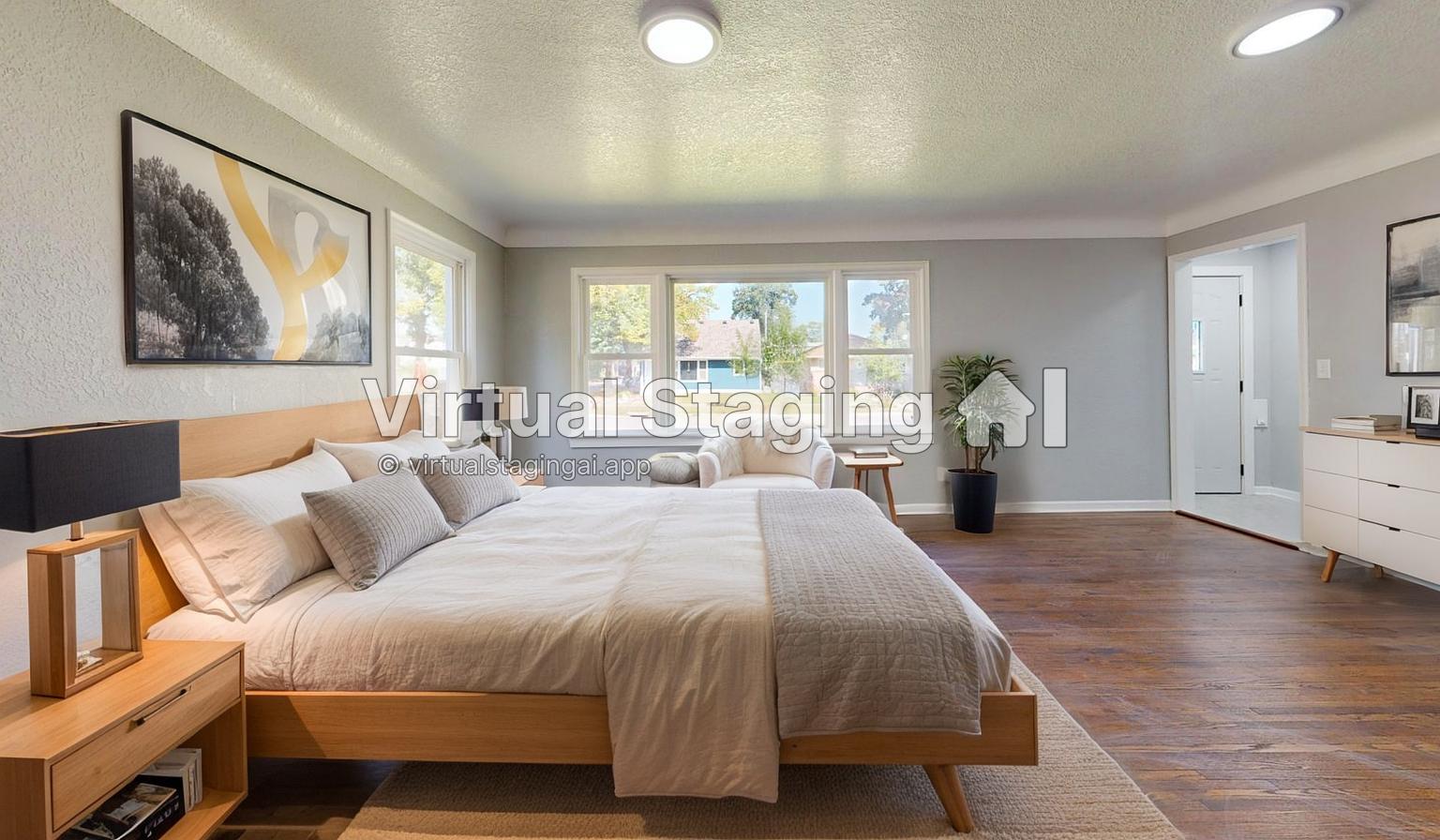
We started with a single empty interior photo — an ordinary listing-style shot. We uploaded the exact same file to each tool, set both to stage a bedroom in a light-wood, modern style, and ran one generation on each. Both results are on the free tier, which is why each carries the tool's own watermark. We left them untouched, so you're seeing the raw output, not something we cleaned up afterwards.

What we found
Same photo, same brief — here's where the two results actually differed.
Realism & cohesion. Virtual Staging AI's furniture, lighting and rug read as one room someone actually decorated. Collov's bed and dresser are fine on their own, but the black lamps fight the soft bedding, and a couple of tells — a stray pair of shoes on the rug, a small object by the dresser — would need a regenerate or an edit before publishing. On this photo, VSA was closer to print-ready.
Speed. No real difference. Both return a staged room in a few seconds, and you can run fresh variations just as fast.
Control & features. This is where Collov pulls ahead. It does more than one-click staging — swapping individual pieces, changing walls and floors, restyling furnished rooms, plus extras like twilight and seasons. Virtual Staging AI is deliberately narrow: upload, pick a style, done. That focus is exactly why it reaches a clean result faster, and also why it gives you less to tweak.
Watermark. Both free tiers stamp the image, as you can see above. Paid plans remove it — so the watermark is a trial limit, not a quality one.
One test, one room, one generation each — worth keeping in mind. Collov sells on breadth and control, which a single staging shot doesn't fully exercise. For a straight empty-room staging, though, VSA gave us the better image.
What they cost
Plans as listed at the time of testing (Oct 2026). Check each site for current pricing.
| Plan | Virtual Staging AI | Collov |
|---|---|---|
| Entry | $16/mo · 6 images | $19/mo · 60 credits |
| Mid | $19/mo · 20 images | $49/mo · 150 credits |
| High | $39/mo · 60 images | $79/mo · 263 credits |
Stage a handful of listings a month and the entry plans are close enough that output quality should decide it. Run a high volume of photos and Collov's cost per image works out lower.
Which one should you use
Pick Virtual Staging AI if you mostly need empty rooms furnished fast, at listing quality, with no learning curve — in this test it got there in one shot.
Pick Collov if you want to restyle furnished rooms, control the individual pieces, or work across more design options, and you're comfortable running a couple of generations. It's also the cheaper choice at high volume.
Whichever you choose, label virtually staged photos as digitally edited in the listing — most MLS rules require it, and it protects you. More on that in our virtual staging guide.
Frequently asked
What agents search before picking a staging tool.
Is Virtual Staging AI or Collov better?
For a straight staging of an empty room, Virtual Staging AI gave us the cleaner, more listing-ready result on the first try. Collov is the stronger pick if you need to restyle a furnished room, swap individual pieces, or work across more design options — and it costs less per image at volume.
How much do they cost?
Virtual Staging AI starts at $16/mo for 6 images, with 20- and 60-image tiers above that. Collov starts at $19/mo for 60 credits, scaling to 150 and 263. Both have a free tier that watermarks the output; paid plans remove it.
Can Collov restage a room that already has furniture?
Yes — that's one of its strengths over a staging-only tool. Collov can clear existing furniture and restyle an occupied room, along with wider redesign options. Virtual Staging AI stays focused on furnishing empty rooms.
Do I have to disclose virtually staged photos?
Yes — label them clearly as "virtually staged." Most MLS rules and buyers expect it, whichever tool produced the image. See our virtual staging guide for how to word it.